Business
These Copywriting Statistics Will Help You Increase Conversions


The art of copywriting is another skillset every writer wants to master. If you’re writing for a brand, copywriting can arguably increase sales. That’s because excellent copy seeks to achieve a particular goal. Whether it’s conversion, app download, email sign-up, or website traffic, copywriting should be in every marketer’s arsenal. If you don’t believe how effective copywriting is, read until the end for some copywriting statistics to persuade you.
But first, let’s define exactly what copywriting is.
Some people interchangeably use content writing and copywriting. However, both are different. Those compelling headlines on ads, landing pages, and print materials belong under copywriting. Did you know that 80 percent of readers never read past the headline? This is what makes copywriting different. It aims to influence action. It aims to sell, download, or click. On the other hand, content writing aims to educate and foster customer relationships.
If you’re not an expert on both, it makes sense to hire someone who is. Did you know that 74 percent of online users are meticulous about spelling and grammatical structures? Any spelling or grammatical error can turn off prospects before you get your message across. That’s why 64 percent of B2B advertisers hire third-party copywriting services. Copywriting also revolves around succinctness. On top of that, there are other vital factors you must consider when writing a copy that sells.
5 Elements of Copywriting
Copywriting should be short and straightforward. It shouldn’t beat around the bush. However, it must make the readers feel like they’re missing out if they don’t take action. To achieve that, consider these five factors:
1. Know your audience
Doing market research to know your audience more is crucial in copywriting. You can do this in many ways, like surveys, A/B testing, or polls. HubSpot says 17 percent of marketers A/B test their landing pages to increase sales.
Knowing your audience’s age, gender, education, culture, language, and more helps you craft better copy. This also allows you to align with your audience’s vision, principles and resolve their pain points.
2. Focus on benefits
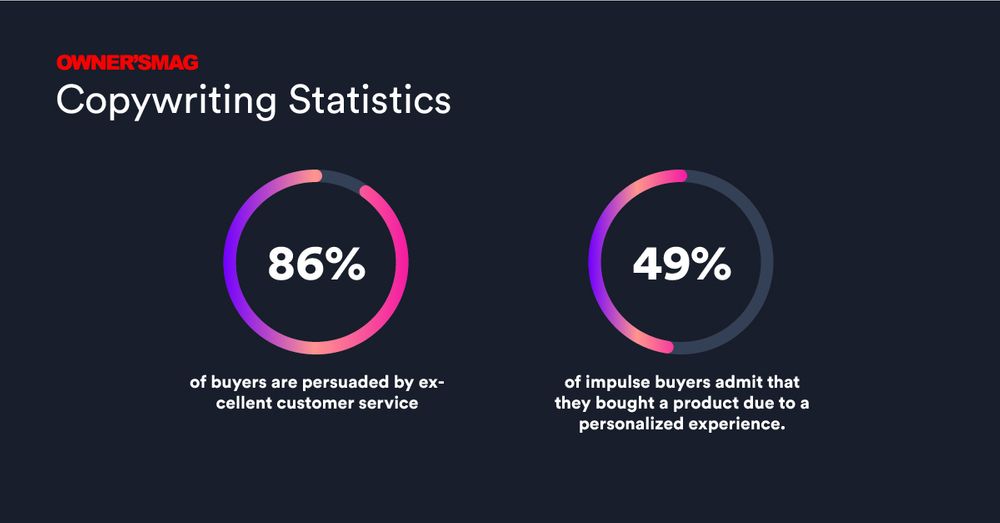
Jot down all your product features, then discover what benefits you can offer to your audience. For instance, if your brand has excellent customer support, showcase that in your ads. Did you know that 86 percent of buyers are persuaded by excellent customer service?
A personalized experience makes consumers feel more special. In fact, 49 percent of impulse buyers admit that they bought a product due to a personalized experience.
3. Create compelling headlines
No matter how visually appealing your ads are, your headlines still play a significant part in getting prospects to read your offers. And if you can’t make them read your offer, then you’ll never drive them to the call to action in the end. On average, eight out of 10 people read the headlines. Unfortunately, only two out of 10 will read the entire copy.
Also, a website’s traffic may vary up to 500 percent based on the headlines alone. To create compelling headlines, here are some tips:
- Write the headline in seven words or less
- Keep it simple
- Let it summarize what the offer is about
- Feature numbers
- Make typography appealing
- Headlines should answer one of the 5 Ws
4. Include a call to action
You can’t expect your copy to convert a lead without a call to action. Every landing page, online ad, or email should include a call to action to make readers take the next action. However, make your call to action captivating. HubSpot says personalized calls to action increase your chance of getting a conversion by 202 percent.
Here are some copywriting statistics and tips on calls to action:
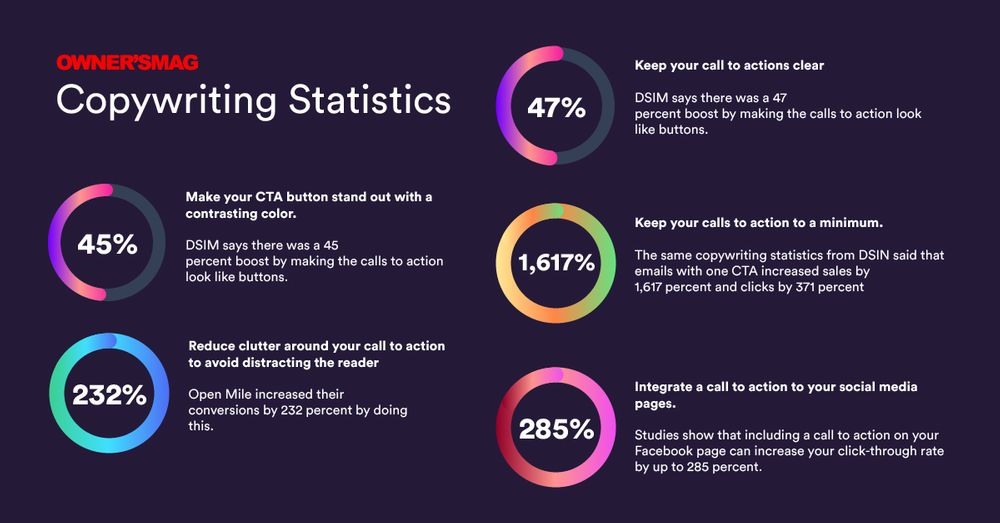
- Make your CTA button stand out with a contrasting color. DSIM says there was a 45 percent boost by making the calls to action look like buttons.
- Reduce clutter around your call to action to avoid distracting the reader. Open Mile increased their conversions by 232 percent by doing this.
- Keep your calls to action clear. DSIM says 47 percent of brands included a clear CTA on their websites that took readers less than three seconds to see.
- Keep your calls to action to a minimum. The same copywriting statistics from DSIM said that emails with one CTA increased sales by 1,617 percent and clicks by 371 percent.
- Integrate a call to action to your social media pages. Studies show that including a call to action on your Facebook page can increase your click-through rate by up to 285 percent.
5. Complement with visuals
Visuals are crucial to your advertising strategies. Indeed, a compelling copy can undeniably cut the mustard, as what these copywriting statistics show. However, visuals can convey better messaging for readers. It also gives your advertisements creative storytelling that can lure users in.
A Venngage study shows that 22 percent of marketers state that design and relevant data were the most significant challenges they faced. Also, 12 percent stated that gearing the content and design to create visually appealing ads is another big challenge. And this is why marketers should entrust the graphic design task to experts like Penji.
Here are some copywriting statistics on graphic design:
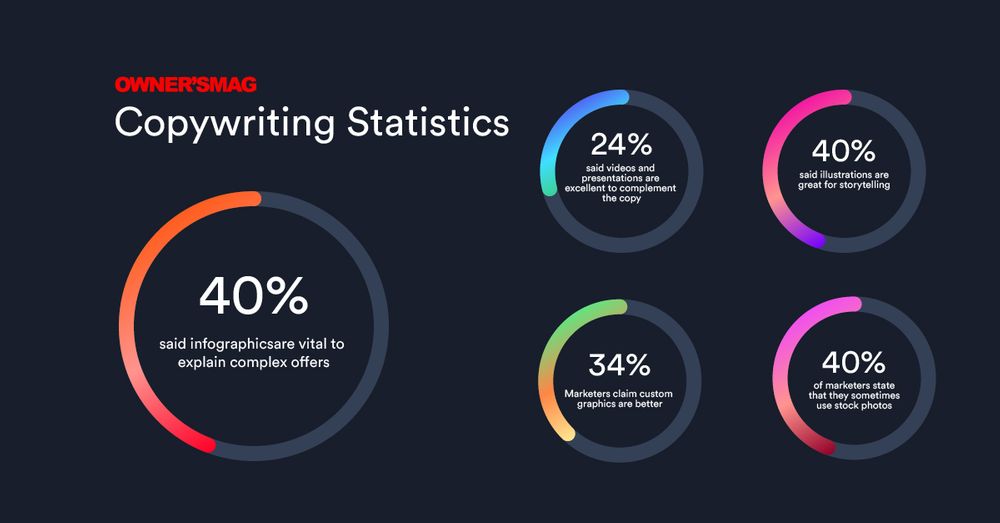
- 40 percent said infographics are vital to explain complex offers
- 24 percent said videos and presentations are excellent to complement the copy
- 40 percent said illustrations are great for storytelling
- 34 percent of marketers claim custom graphics are better
- 40 percent of marketers state that they sometimes use stock photos
Conclusion
When writing copy, write with the users in mind. Tell them your product features and benefits, and show how the benefits will ease their pain points. Then show them how nice it would be if they experience these first-hand. Additionally, instill a feeling of FOMO in all your offers. According to OptinMonster, seven out of 10 millennials experience FOMO or the fear of missing out.
Also, 56 percent of people have a fear of missing out on news and events. If you instill a sense of urgency in your advertisements, especially on social media, you’ll get users to act.
These copywriting statistics should be enough to make you create the most compelling copy on all channels. If you want to outsource your copywriting needs, check out Content Fuel.



Surprisingly, MLMs have become one of the most lucrative scams in recent years. But to sum it all up, its structure is only beneficial for those at the top, as they are the ones making all the money. Meanwhile, the new recruits are at the bottom, waiting for scraps.
Although various efforts have been underway to expose these pyramid schemes, many people still fall for them. It seems that the trend has never really died down, as we often see a new trend of scrappy moms and fresh-outta-college girls going ga-ga over these weird products. One of the more controversial is Elomir’s Axis Klarity.
Before this was launched, many distributors posted videos and images of themselves with photoshopped Post-its on their tongues. And of course, they were passing it off as a real product. Soon enough, the hashtag #Changetheconversation was plastered all over social media.
So, what could have gone wrong? Let’s go over the story of Axis Klarity and its parent company, Elomir.
About Axis Klarity and Elomir
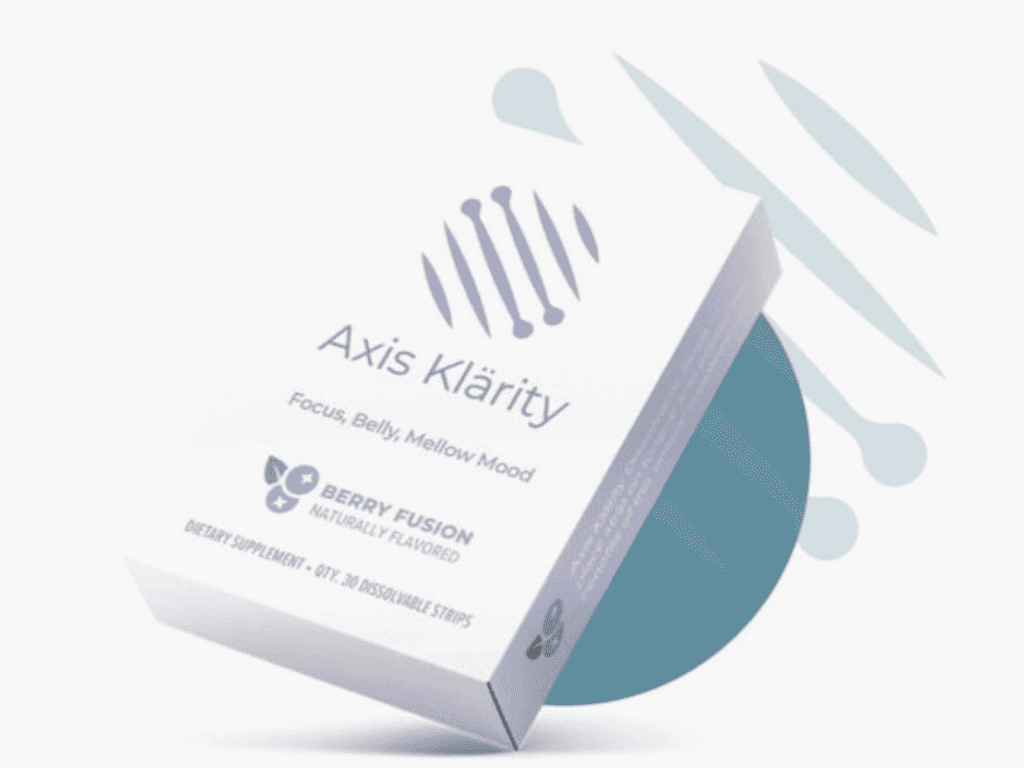
Axis Klarity is a product created by Elomir, making a buzz in 2022. It still exists today, but seems to be operating under the radar. That said, let’s get to know it better.
If you’re familiar with those Listerine strips that dissolve on your tongue, then you’ll find this product to be similar. Only, instead of making your breath smell minty fresh, Elomir claims that it’ll improve your mood, calm your mind, and increase your cognitive abilities. How does it do this, exactly? Who the f*ck knows? Their website doesn’t explain much.
It does offer a few testimonials, mostly from women who happen to be distributors. There is one testimonial from a 13-year-old girl, claiming that Axis Klarity had helped her in school.
There’s only one problem with that: on the bottom of their website, in tiny print, Elomir states that their flagship product is not intended for those under 18.
Strange. But I’m sure it’s nothing, right?
Red Flags… Red Flags Everywhere!

Now, here’s the deal with Axis Klarity; the ingredients are alarming.
Before Axis Kalrity’s launch date, people searched their website for an ingredient list. Here’s what’s in these “cure-all” yellow strips:
- Curcumin Conjugate
- NAC Conjugate
- Thiamine Conjugate
First off, there’s really nothing here that would cause a change in mood, clarity, or any other benefits listed by their distributors. But what’s even shadier is the ingredient “NAC Conjugate.” This is an antioxidant that should be inaccessible to the general public.
So how does Axis Kalrity, an unregulated supplement, include this ingredient? It seems that the FDA is pretty lax about NAC Conjugate, despite declaring that it is not a supplement. Unless a company is promoting their NAC Conjugate as a cure-all, they don’t have to worry about the FDA busting down their door.
Still, I personally wouldn’t take prescription drugs from an unregulated source (unless I’m trying to party).
Okay, so we now know the product is crap. But what about their business practices?
For the longest time, Axis Klarity was in this “pre-enrollment phase”. It’s basically like preordering a game on Origin, but surprisingly shadier. Because instead of preordering products, people were signing up as future sellers. Before making any actual sales, Elomir was already making millions off recruitments alone.
But that’s not all. When Elomir finally launched their knock-off dental strips, it was a MASSIVE flop. Hundreds of orders went unfulfilled, as the number of products they had in stock couldn’t cover the number of people buying them. Still, Elomir took the money from everyone who ordered, offering no refunds.
The company later claimed that this ordeal was due to machinery issues. But anyone with a brain could tell that they were simply unprepared.
Elomir continues to push forward, promoting Axis Klarity with flaky testimonials while their distributors and customers lack compensation for their orders.
Conclusion

It’s an MLM, through and through – ‘nuff said. If you’re thinking about buying Axis Klarity or becoming a seller, just… don’t. I recommend saving your time and money by purchasing some of those Listerine strips. You’ll actually get what you pay for.
Featured image from Elomir


How can you recession-proof your business?
This is a common question among business owners who are concerned about how well they will fare in an unpredictable economy.
Whether or not we’re officially in a recession, many companies are feeling the pressure—rising costs, shifting consumer habits, and ongoing market uncertainty. While no business is completely immune to downturns, there are practical strategies you can adopt to strengthen your resilience.
But what is a recession-proof company?
A recession-proof company is a business that can maintain stable revenue and demand even during economic downturns. These ventures typically offer products or services that consumers continue to need regardless of financial conditions.
In this guide, we’ll explore key ways to make your business more recession-proof and help you navigate today’s challenges with confidence.
Are We in a Recession?

The term “recession” often sparks panic, but its technical definition is more specific. A recession typically refers to two consecutive quarters of negative gross domestic product (GDP) growth.
As of 2025, many economies have shown signs of slowing down, like higher inflation, cautious consumer spending, and volatile markets. However, most experts agree we are not currently in a formal recession.
Key indicators, such as GDP growth, employment rates, and consumer demand, remain relatively stable in the U.S. and many parts of the world. Still, uncertainty looms due to persistent global conflicts, supply chain disruptions, and high borrowing costs.
Even if we’re not in a recession by definition, businesses are feeling the squeeze. That’s why preparing now and building a recession-proof business is crucial to staying strong through future economic shifts.
Will There Be a Recession?
Predicting a recession is tricky, and even seasoned economists debate its timing. While the economy may not be in a technical recession today, many experts warn that a downturn could still happen in the near future. High inflation, fluctuating interest rates, and global instability keep businesses on edge.
That’s why building a recession-proof business now is a smart move. Some industries can weather economic storms better than others. What business does well in a recession, and what sells best in a recession? If we look back at history, the ventures that thrived in the 2008 recession included:
- Discount retailers
- Repair services
- Healthcare
- Essential goods providers
These businesses focused on solving everyday problems and offering cost-effective solutions, something customers prioritize when money is tight.
On the flip side, the worst businesses to start during a recession are often those that rely on:
- Luxury spending
- Large capital investments
- Non-essential services (high-end travel, event planning, niche hobby stores, etc.)
These ventures typically struggle when consumers cut back on discretionary spending.
Even if the next recession doesn’t arrive tomorrow, building flexibility and resilience today will help you prepare for whatever comes next.
5 Ways to Recession-Proof Your Business
If you’re a business owner concerned about the economy, these 5 tips can help.
1. Find Low-Cost Solutions
Survive a recession by saving money. Brilliant, right? But this isn’t just about cutting temporary costs to weather the storm. To truly recession proof your business, you need to set up for the future.
Some businesses choose layoffs and department closures when times are tough, but this shouldn’t be your first resort. For starters, think about scaling back your operating costs. Consider migrating to cloud storage, or finding cheaper software alternatives.
For example, many businesses rely on freelancers to supplement their creative team, which can start to add up when you need a lot of designs.
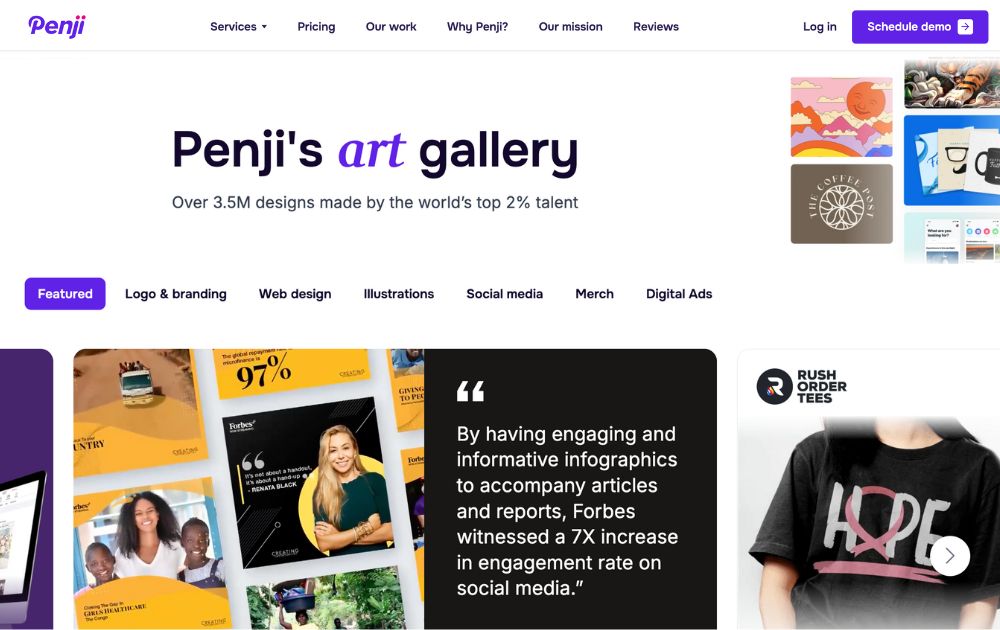
You might find that you save money by switching to a subscription-based graphic design service like Penji. Check out our review to see why we recommend it. You can also sign up with our special 35% off promo code — PREP35.
2. Put People First
In a recession, you may have to scale down your business operations, and that can mean letting people go. But if you intend to survive the recession, mass layoffs may do you more harm than good.

A business is made up of people, and each worker plays a role in developing your brand’s unique personality. Layoffs can sour long-term relationships, but they can also change who your company is on a fundamental level.
In a recession, some downsizing might be inevitable. But to recession proof your business, aim for transparency. Talk to employees about your difficult decisions, let them know where you’re cutting costs and what prospects may look like down the road.
3. Rethink Your Architecture
Every application has an architecture. If you produce tech, you can recession-proof your business by rethinking how you deliver it.
For example, you may consider a microservices architecture, which is sometimes less expensive than a singular (“monolithic”) setup. This considers each element of your service as its own mini-service.
For instance, an ecommerce site might use different services for accessing a user’s account, their shopping cart, and processing their payment. The user still sees one website, but under the hood, they’re accessing different services.
4. Demonstrate Your Value
Chances are, you’ve already given a lot of thought to what, exactly, your business offers. It should be at the core of all your marketing materials, your whole brand strategy.

But to recession-proof your business, you’ll need to double down. It’s not just, “What can we do for you?” It’s, “Why do you need us?”
Some of the best ways to demonstrate your business’ value include:
- Money saved
- Life improved
- Everyday problems solved
- What sets you apart from competitors
5. Be Flexible
On the one hand, you want to hold onto your business fundamentals to survive a recession. Your people, your values, your product. But when something needs to change, you can’t afford to be too precious about your current processes.

Be willing to make changes, but make informed ones. Test out new messaging, new products, new pricing models. If your ads are losing ROI, it might just be a sign of the times, but it’s worth looking into different strategies that could give you a boost.
You might think that in order to recession-proof your business, you need to avoid showing signs of weakness. The fact is, the most stubborn businesses are often the first to go.
Markets change a lot during a recession. When you come out the other side, you want to be ready to meet whatever new challenges come your way.
The Lowdown
Learning how to recession-proof your business isn’t about avoiding risk but creating stability in an unstable economy.
While you can’t control the economy, you can control how you prepare. Focus on cutting unnecessary costs without sacrificing your team, demonstrate clear value to your customers, and stay flexible with your strategies.
Businesses that survived the 2008 recession didn’t just hold on; they evolved. The best way forward? Start building resilience now so your business can thrive, no matter what the market throws your way.


McKinsey & Company reveals that 73 percent of bank transactions worldwide now take place online, such as in digital banks and payment systems. The increasing demand of customers for more flexible banking options is attributed to the rise in online banking channels. People prefer online banks because they offer simple tools and resources to manage their money. With this trend, online banking is here to stay.
Best Online Banks: A Quick Guide

Image Source: Tima Miroshnichenko from Pexels
An online bank should cater to your financial needs like any traditional alternative. Here are a few factors to consider when choosing online banks:
Annual Percentage Yield (APY)
The annual average yield offered under each account will tell you how much interest your money will earn. When comparing online banks, consider one that offers competitive rates across all of its deposit accounts.
Products and Services
Some online banks offer a complete package of banking products, including checking, savings, certificates of deposit (CDs), and money market accounts. They also offer loans and credit cards. So, look at the products and services offered by online banks before making a decision. You may also combine the services of an online bank with a traditional brick-and-mortar bank.
Account Access
Typically, online banks offer 24/7 access to your account through their website or app. However, you should also consider how the bank handles deposits and withdrawals. It is crucial to know the restrictions, if any, on transfers, the limitations on withdrawals, and whether the bank accepts free cash deposits.
ATM Network
An ATM network is essential if you frequently withdraw or deposit cash. An extensive ATM network will help you avoid transaction fees. If the bank is not associated with a large ATM network, you should look for one that will reimburse out-of-network ATM fees.
Digital Tools
The best online banks offer innovative digital tools to help you accomplish financial goals. For example, Ally will help you organize your savings goals with savings buckets and analyze your spending habits to safely transfer available funds from your checking to your savings account.
Fees
You should avoid any bank, online or otherwise, that charges monthly fees or has extensive requirements to avoid them. Many online banks offer no-fee deposit accounts, require a low or $0 initial deposit to open the account, and don’t need a minimum balance to avoid maintenance fees. However, make sure you know whether the bank charges excessive withdrawal fees, paper statement fees, or fees for other services that you may want to use regularly.
Customer Service
Since you won’t have access to in-person customer service with an online bank, determine how you can contact a customer service representative if needed. Most online banks offer telephone support, live chats, or assistance via email. Some online banks also offer access to live support via extended hours or 24/7.
10 Top-Performing Online Banks

1. Alliant Credit Union
Alliant Credit Union is an NCUA-insured online credit union offering members competitive deposit account rates and minimal fees. Most accounts don’t charge maintenance fees, but these can be waived if you sign up for e-statements. Membership is available for current or former employees of Alliant’s partner businesses in the US. You can also become an Alliant Credit Union Foundation digital inclusion advocate to become eligible for membership. Signing up costs $5, but Alliant will pay the one-time fee on your behalf.
Alliant’s certificates earn solid APYs, with terms ranging from one year to five years. Its savings account earns a respectable yield of 3.10% APY on balances of $100 or more, but there are plenty of higher-yielding savings accounts with APYs over 5%. We like that Alliant’s High-Rate Checking account pays a better yield than other checking accounts and doesn’t require a minimum balance or charge service fees.
2. Varo Bank
Varo offers checking and savings accounts but doesn’t offer deposit certificates. Savings account comes with an APY starting at 2.50%. That rate becomes 5.00% for the first $5,000 if a customer meets the monthly requirements of the bank.
Cash deposits have limits and fees, and Varo customers can only deposit cash at a 3rd party retailer that joins the Green Dot network, including CVS, 7-Eleven, or Walgreens. On the other hand, cash withdrawals can be made through an ATM in the Allpoint network for free.
3. Ally Bank
Established in 2009, Ally Bank is full-service online bank that offers competitive rates on all deposit accounts. Customers can enjoy the highest rates for all balances, regardless of tier. Overall, the high APYs, minimal fees, and reliable customer service support makes Ally an excellent banking solution for millenials who want better savings and retirement plans.
4. Discover Bank
Discover Bank offers deposit accounts, credit cards, personal loans, and student loans. We like that Discover offers deposit accounts, such as CDs, savings, and a money market account, at competitive rates with no fees. While its $2,500 minimum deposit requirement for its CDs is steep, there is no minimum deposit required to open and maintain a savings, money market, or checking account.
5. Laurel Road
Laurel Road, powered by KeyBank, helps healthcare and business professionals achieve their financial goals. They offer student loan refinancing, mortgages, personal loans, credit card, and specialized savings accounts. Laurel Road also offer Loyalty Checking with a low APY. New customers can earn a sign-up and monthly bonus with qualifying direct deposits. In addition, both savings account and checking account has no monthly free or minimum balance requirement.
6. Capital One
Capital One offers an above-average 3.80% APY on its savings account, strong rates on its certificates of deposit, and 0.10% APY on all checking balances. All accounts are free, and customers can access over 70,000 free ATMs.
7. American Express National Bank
This bank offer High Yield Savings Account with a 3.80 APY. Likewise, certifcate deposits (CDs) have competitive rate and there is no minimum opening deposit. You don’t have to worry in case you encounter banking-related issues because American Express National Bank has 24/7 phone support and online chat support.
8. Marcus by Goldman Sachs
Launched in 2016, Marcus is the online-only banking arm of Goldman Sachs, one of the 15 largest banks in the US. The bank’s savings accounts and CDs offer competitive yields and no monthly maintenance fees.
While some online banks offer no minimum deposit requirement to open an account, Marcus requires a $500 deposit to get started with a CD. There’s no minimum deposit requirement for its high-yield savings account. Marcus doesn’t offer a checking account or money market account.
9. My Banking Direct
My Banking Direct is the online-only arm of Flagstar Bank, N.A., which New York Community Bancorp owns. The bank is a lean financial service that offers only savings, checking, and a five-month CD term. The APYs on its savings account and CD are among the best available today.
In addition, the bank doesn’t charge monthly or overdraft fees and provides surcharge-free ATM access through a 55,000 Allpoint and Presto network. To open a savings account, you must deposit $500. Checking accounts can be opened with just $1. During the week, you can access extended customer service hours until 8 p.m. ET and 2 p.m. ET on Sundays.
10. SoFi
SoFi (short for Social Finance) was the brainchild of Stanford Graduate School of Business students who created an alumni-funded lending source initially focused on refinancing student loans. Since then, SoFi has expanded into a variety of loan categories and now offers online checking and savings accounts.
Conclusion
Online banks lets manage your money and account via a website, mobile device, or app. Also, online banks generally offer higher interest rates and fewer fees than traditional banks. You should remember that while technology makes everything accessible, online banks also have some limitations. For instance, online-only or internet-only banks lack in-person interaction. However, if you are comfortable managing your money online, online banks are a convenient and low-cost option.

Why Having an Advisory Board Could Make or Break Your Startup

Best Gift Guide for Men: Perfect Gifts for Every Occasion

What’s the Deal With Elomir? Is Axis Klarity a Scam?

The Best Ways to Recession Proof Your Business

Discover 2025’s Top 10 Online Banks for Smart Savings

Digital Nomads Flock To These 10 Amazing Tax-Free Cities

Loom Review: Features, Use Cases, and How It Stacks Up Against Zoom
What’s the Deal With Elomir? Is Axis Klarity a Scam?
Why Having an Advisory Board Could Make or Break Your Startup
Loom Review: Features, Use Cases, and How It Stacks Up Against Zoom
The Best Ways to Recession Proof Your Business
Best Gift Guide for Men: Perfect Gifts for Every Occasion
Discover 2025’s Top 10 Online Banks for Smart Savings